
In this article I will talk about the state of Unreal's MVVM plugin and how to make the most out of it with hand rolled re-usable Bindable Collections.
Check out the source code and demo project here: https://github.com/EightOunceGames/ue-mvvm-collections.
Feel free to use the code in your own projects and games.
Introduction to MVVM in Unreal
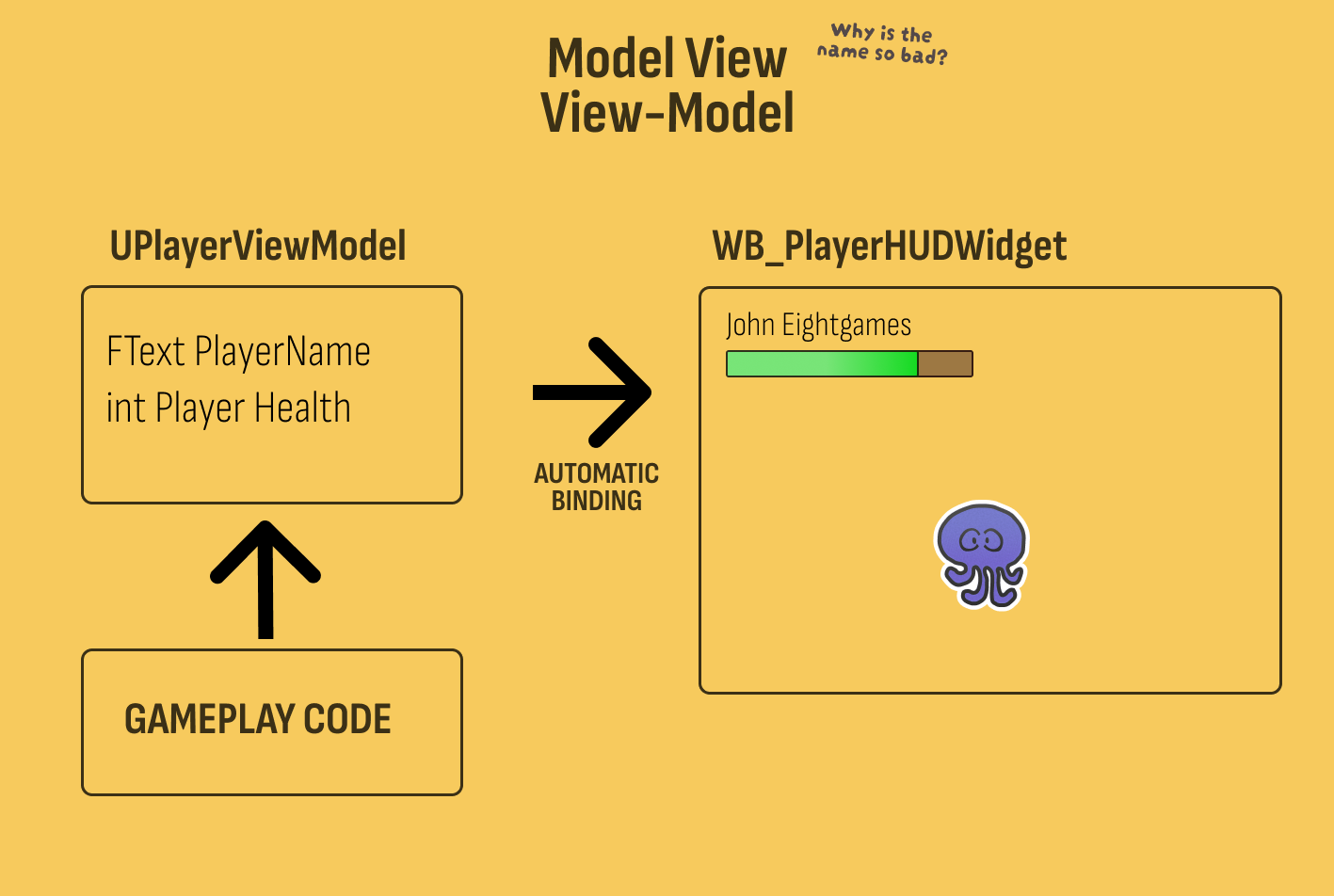
Unreal 5 now comes with a great way to simplify how UI is authored with industry standard MVVM (Model-View-ViewModel) plugin. If you have not used MVVM before it is a simple but effective concept:
MVVM Requirements
- Separate the data and the presentation.
- Have a rich suite of tools to author bindings from data into the presentation.
Here Binding means a system where the Widget is automatically kept up to date with the View-Models properties.
The Widget is your View, The View-Model is your View-Model, and the "Model" is less tangible. Think of it as just "a data source" or ignore it completely from your thoughts. The magic is the View-Model and the Bindings.
MVVM Benefits
In Unreal MVVM will significantly reduce how much Blueprint or C++ UI code needs to exist. Basically, you do not need any at all.
Engineers are responsible for setting up View-Model accessibility and managing the data on C++ side, Technical Designers are responsible for selecting the bindings and building beautiful widget layouts in UMG designer.
The missing feature: Bindable Collections
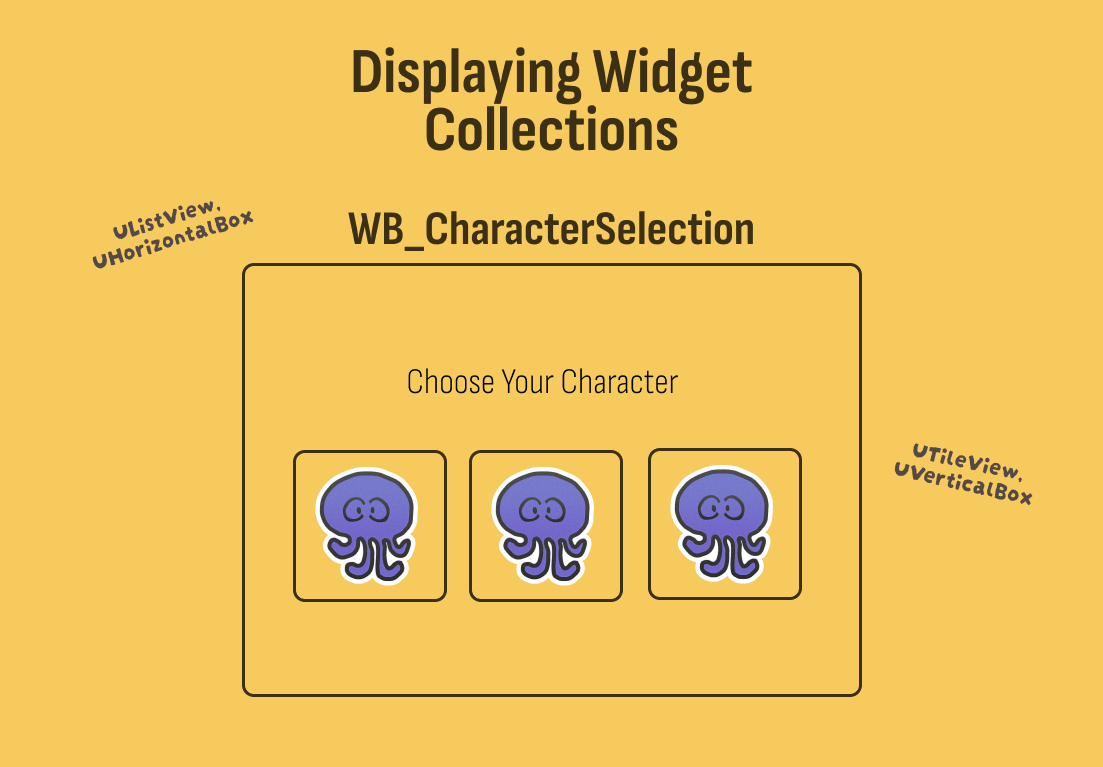
Unreal's MVVM plugin is sadly missing bindable collections. Collections are what I often see studios get wrong as it often requires looking into game data and dynamically keeping widgets populated in a visual collection and keeping all the presentation up to date. Quickly projects will run into too much boilerplate, Garbage Collection hitches, and UObject count crashes.
If you are doing MVVM in Unreal you simply must have Bindable Collections.
What do I need to make bindable collections?
-
A list containing pointers to View-Models and functions to bind, instantiate, and pool View-Models by class to a widget.
-
A suite of Slate/UMG widgets to be bound to. So instead of
UHorizontalBoxyou useUBindableHorizontalBox. -
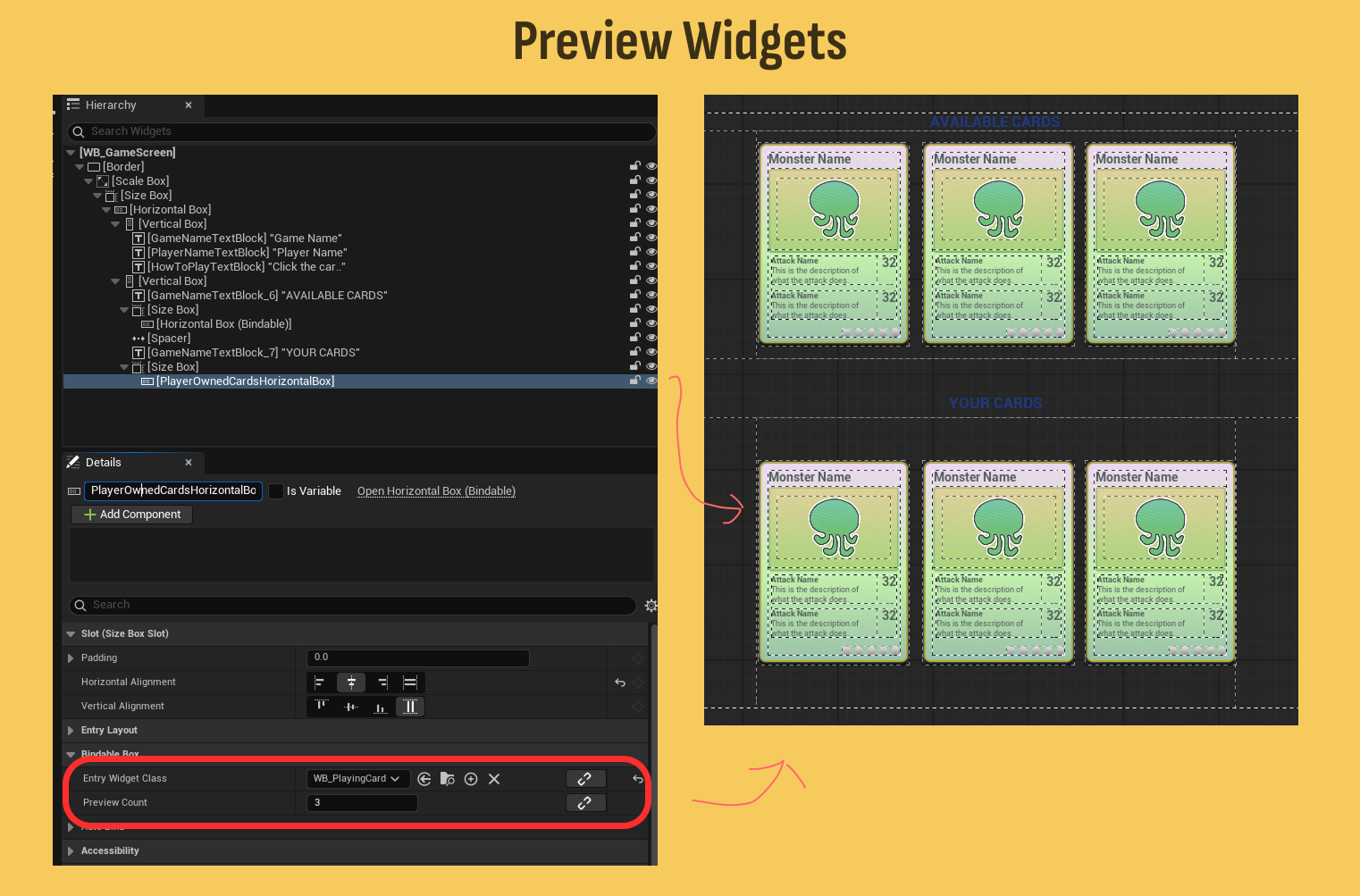
Preview tools so you can see collections in editor
My solution for you
I've built some bindable collections for myself and want to share them with you. I've quickly pulled them out of my game for sharing so they are not feature complete, consider them a starting point for your own collections and ideas.
Check out the source code and demo project here: https://github.com/EightOunceGames/ue-mvvm-collections
Classes included
UObservableViewModelCollection. This is the list you'll put in your View-Models and bind to collection widgets.UBindableListView. A bindableUListViewsubclass for recycled virtual lists.UBindableTileView. A bindableUTileViewsubclass for tiled widgets.UBindableVerticalBox. A bindableUVerticalBoxsubclass to stack widgets vertically.UBindableHorizontalBox. A bindableUHorizontalBoxsubclass to stack widgets horizontally.
Feature: Preview Entries
Those familiar with UListView may enjoy the Preview Entry feature that allows you to fill the UMG designer with mock widgets which makes it much easier to itereate on. Each of my bindable collection widgets support a EntryWidgetClass and a PreviewCount.
Feature: Automatic Global Binding
Almost all of your games UI state can be offloaded into Global View-Models which greatly simplifies how coupled and complex your game code is. All my collection widgets support quick binding to global View-Models.
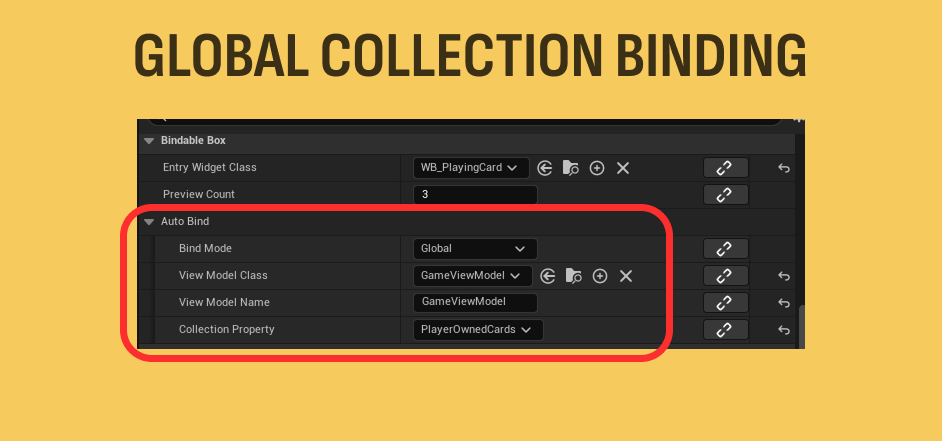
I incorporated this idea into each collection widget. To bind to a collection living on a global View-Model simply select the global View-Model and select the collection to bind to.
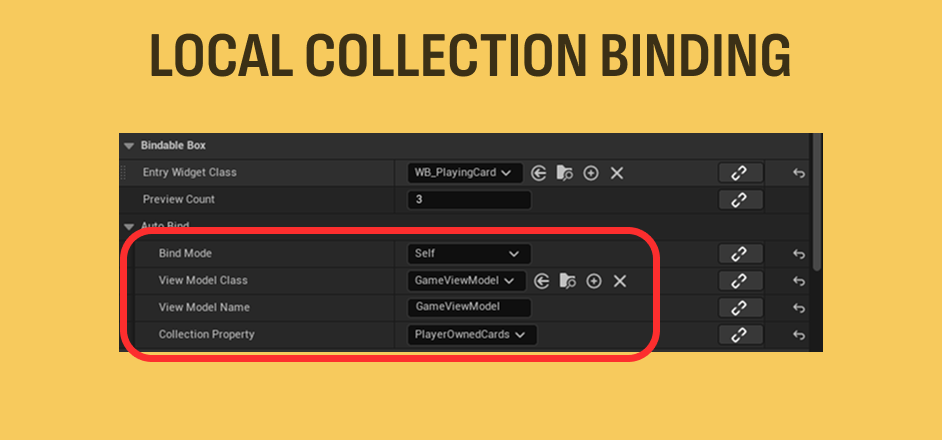
Feature: Automatic Local Binding
Here local binding means that the owning Widget Blueprint has a bound View-Model and you want to choose the collection from it.
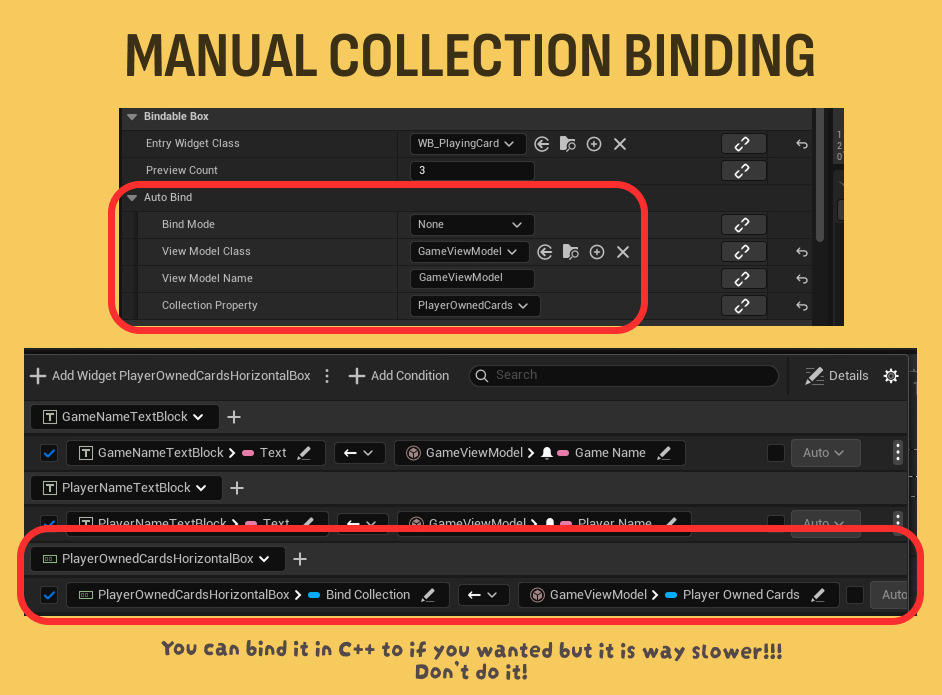
Feature: Manual Binding
You can also use the UMG View Bindings tab and just bind the collection to any property you have access to.
The Trading Card Demo
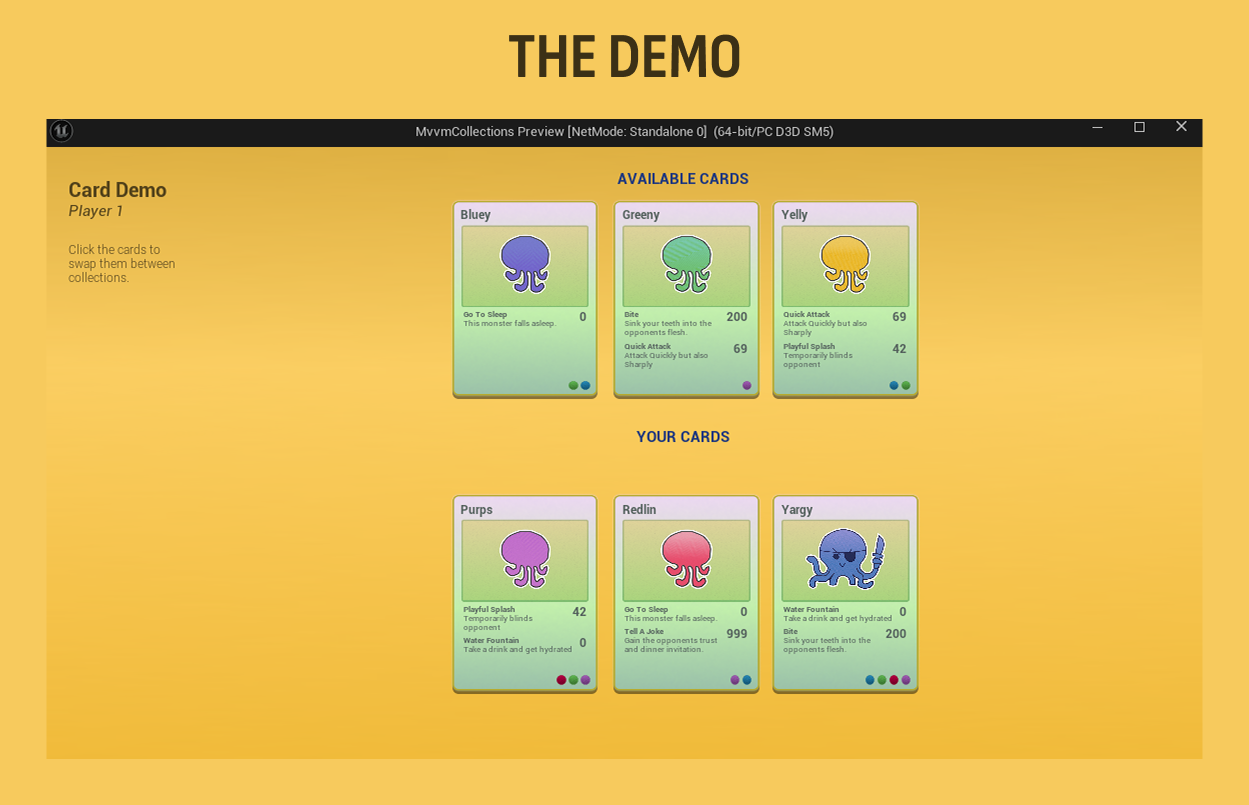
I've created a small Trading Card viewer to show off how to manage your global View-Models, back them by UDataAssets, and how to bind them to a view without a single Blueprint node.
Goal
- Designers can author Cards, Attacks, and Buffs data and widgets using MVVM.
- Each card contains multiple Attacks and Buffs.
- Player can see all available cards and move cards into their deck.
- Clicking a card changes the card View-Models
bOwnedByPlayerproperty and the UI automatically updates.
Architecture
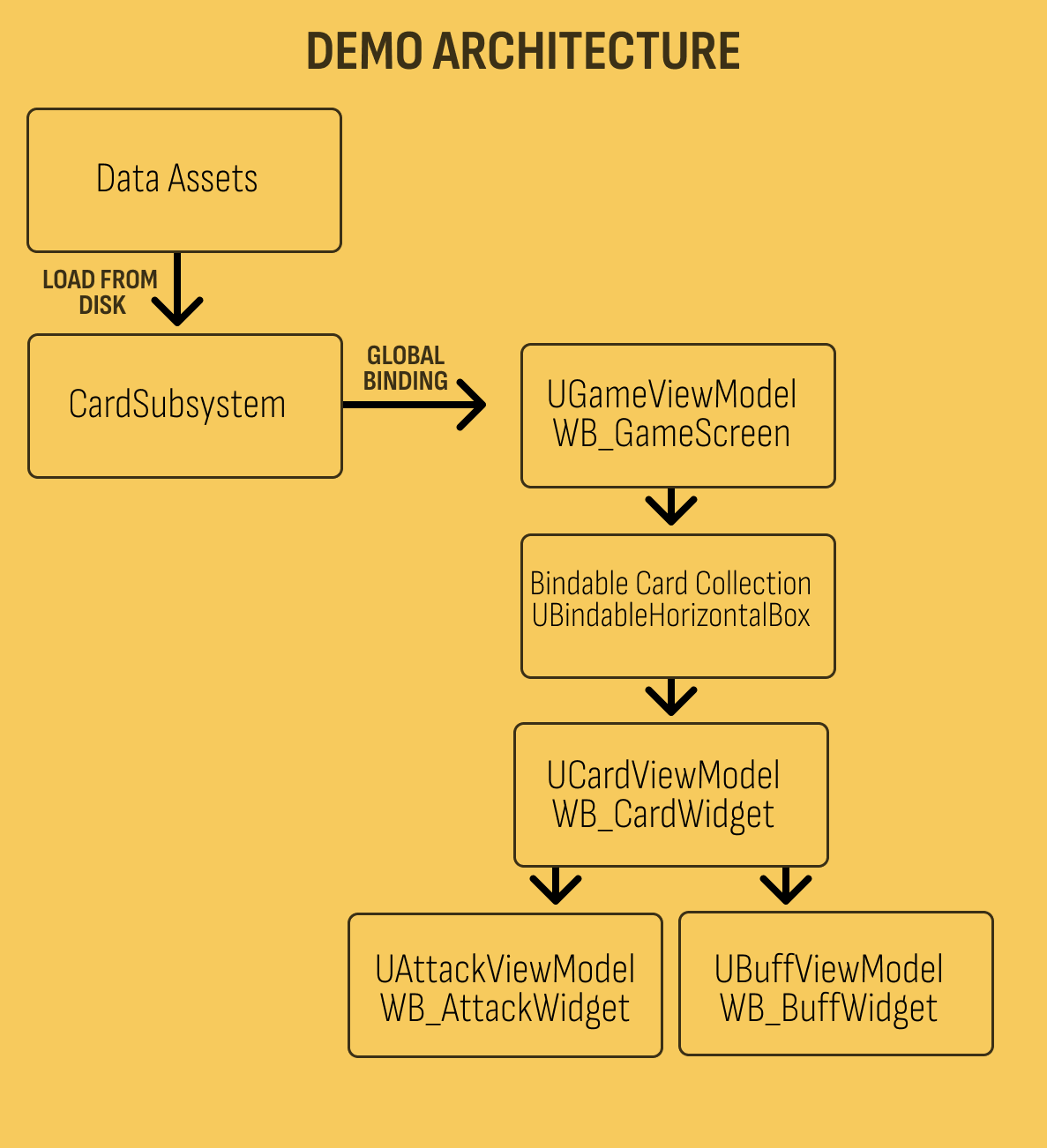
- A
UWorldSubsystemthat is responsible for loding theUDataAssetsand creating the global View-Model to be consumed by the UI. UDataAssetsfor Card, Attack, and Buff.- View-Models for Card, Attack, and Buff.
- A Main Page widget that contains subwidgets for binding Field Notify properties and BindableCollections.
- A Card EntryWidget for each card in our collection.
- Sub-widgets for the Card EntryWidget for Attacks and Buffs.
Card Breakdown
The card is a good example of using View-Models for plain properties like FText and also Bindable Collections. The monsters Attacks and Buffs are Bindable Collections, for every entry in the collection a subwidget is created.
When the player clicks on the card the ToggleIsOwnedByPlayer is called on the View-Model through the UMG View Bindings tab. This function flips the bIsOwnedByPlayer bool which causes the Card Subsystem to move the card from one collection to the next.
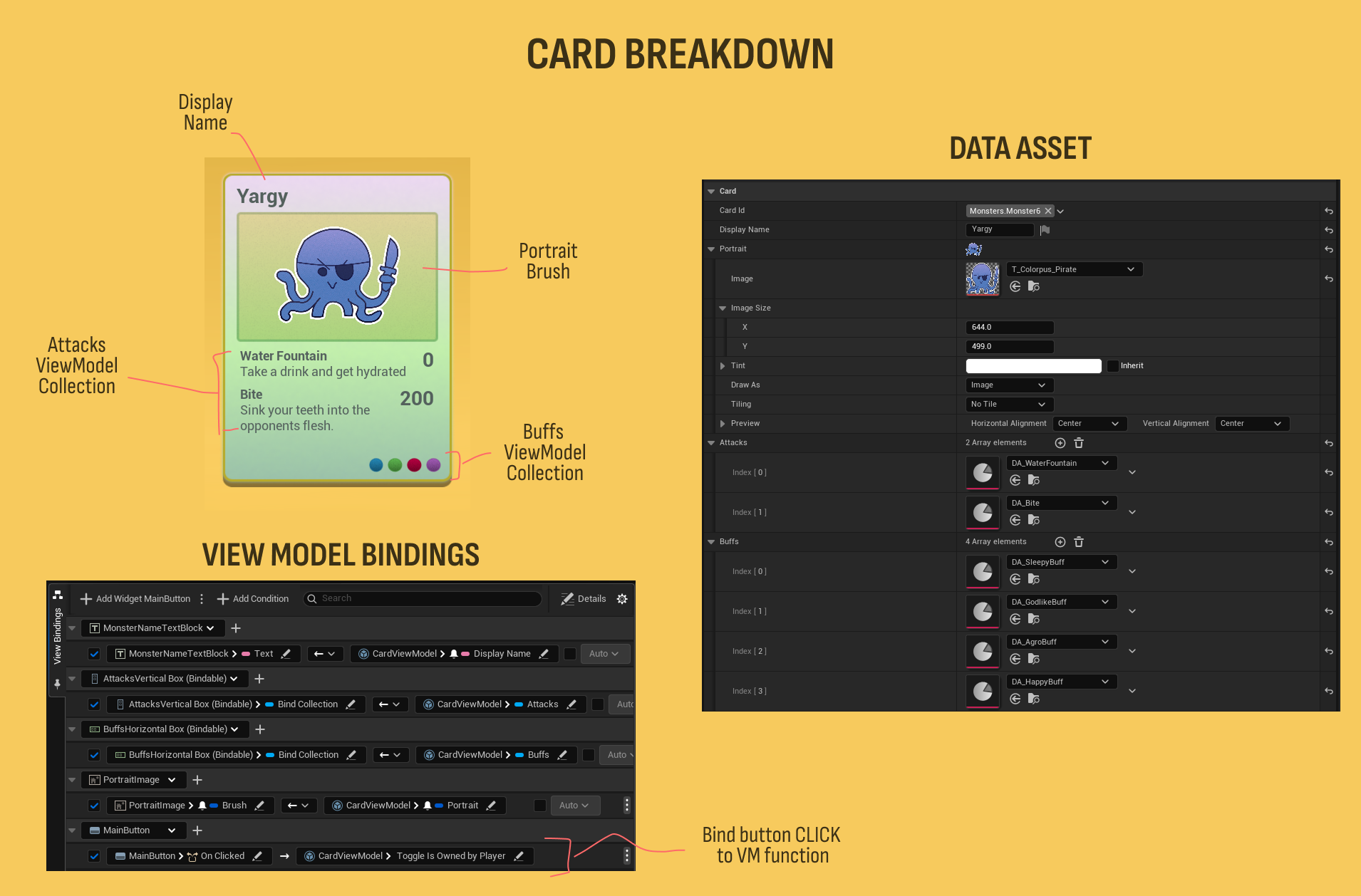
// a quick look at the cards FieldNotifies
UCLASS(BlueprintType)
class UCardViewModel : public UMVVMViewModelBase
{
  GENERATED_BODY()

public:
	UPROPERTY(BlueprintReadOnly, FieldNotify)
	FGameplayTag CardId;

	UPROPERTY(BlueprintReadOnly, FieldNotify)
	FText DisplayName;

	UPROPERTY(BlueprintReadOnly, FieldNotify)
	FSlateBrush Portrait;

	UPROPERTY(BlueprintReadOnly, FieldNotify)
	bool bIsOwnedByPlayer = false;

	UFUNCTION(BlueprintCallable, Category = "Card")
	void ToggleIsOwnedByPlayer();

	// a collection of UCardAttackViewModels
	UPROPERTY(BlueprintReadOnly)
	TObjectPtr<UObservableViewModelCollection> Attacks;

	// a collection of UCardBuffViewModels
	UPROPERTY(BlueprintReadOnly)
	TObjectPtr<UObservableViewModelCollection> Buffs;
}
Conclusion
Take a look at the demo project and consider stealing these collections for your game. If you liked this article or have questions please consider dropping a comment or getting in touch with me.




Comments
If you liked our content please leave a comment.