Authoring Text
This page goes over how to author your text in your native language and prepare it for translation. Ensure you have read the Fundamentals in the getting started section.
Author-At-Source: GML
You can continue to author text in .gml files and object script events the same way you did before but wrapped in functions that serve two purposes.
- Act as a code marker to identify this text and its location to be used in the Gather process. This is how your text comes out of
.gmland into the Cultured Dashboard. - Performs a runtime lookup to return translated text.
Automated Text Identities
The most basic syntax lets you author a text and use it without having to specify the Key.
autogen::obj_player_prompt::Press Start To Continue// create event
action_text = cultured("Press Start To Continue")
action_font = cultured_get_font("header");
// draw event
draw_set_font(action_font.font);
draw_text(x, y, action_text.str);
Manual Text Identities
You can also specify what your Key is. When generating your own key remember you can embed contextual information about the text with well named keys.
action_prompts::press_start::Press Start To Continue// create event
action_text = cultured("action_prompts::press_start", "Press Start To Continue")
action_font = cultured_get_font("header");
// draw event
draw_set_font(action_font.font);
draw_text(x, y, action_text.str);Keys that are not autogenerated can be looked up at any time using cultured_get and providing just the Key. Since this is only data retrieval a native text or full text identity is not required.
// get a reference to the cultured() text we authored in the previous example
that_action = cultured_get("action_prompts::press_start");
action_font = cultured_get_font("header");

// draw event
draw_set_font(action_font.font);
draw_text(x, y, that_action.str);
Author-At-Source: Instance Variables
It is often useful in your games to place down an instance in the room editor and then override what the text says, like in the case of a generic signpost the player reads with a unique message in each instance.
rm_room1::obj_sign::sign1::sign_text::<- North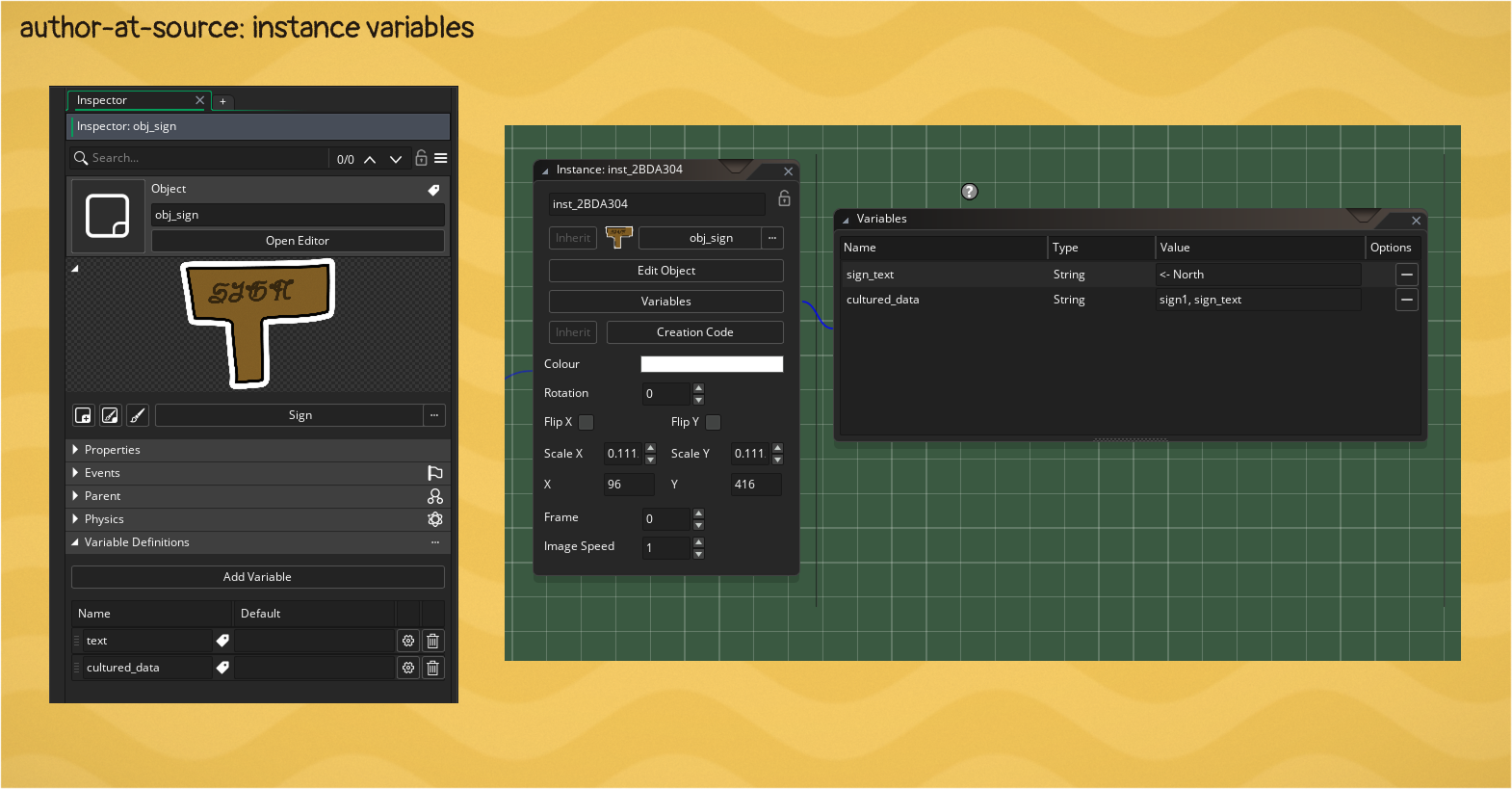
- Create a
cultured_datavariable in the variables window in your object. - Create an empty string variable that you want to override per instance
- Create a comma separated list that contains a unique
Keyfor this instance followed by all of the instance variables that Cultured should consider as unique text for localization
As an example. If your key is sign1 and your localized variable is sign_text then your cultured_data would be sign1, sign_text.
These texts will be found during the Gather part of the pipeline and translatable. To fetch the localized text for drawing you must call cultured_get_instance_var.
// create event
action_prompt_localized = cultured_get_instance_var("sign_text");
action_font = cultured_get_font("header");

// draw event
draw_set_font(action_font.font);
draw_text(x, y, action_prompt_localized.str);
Author Externally: String Tables
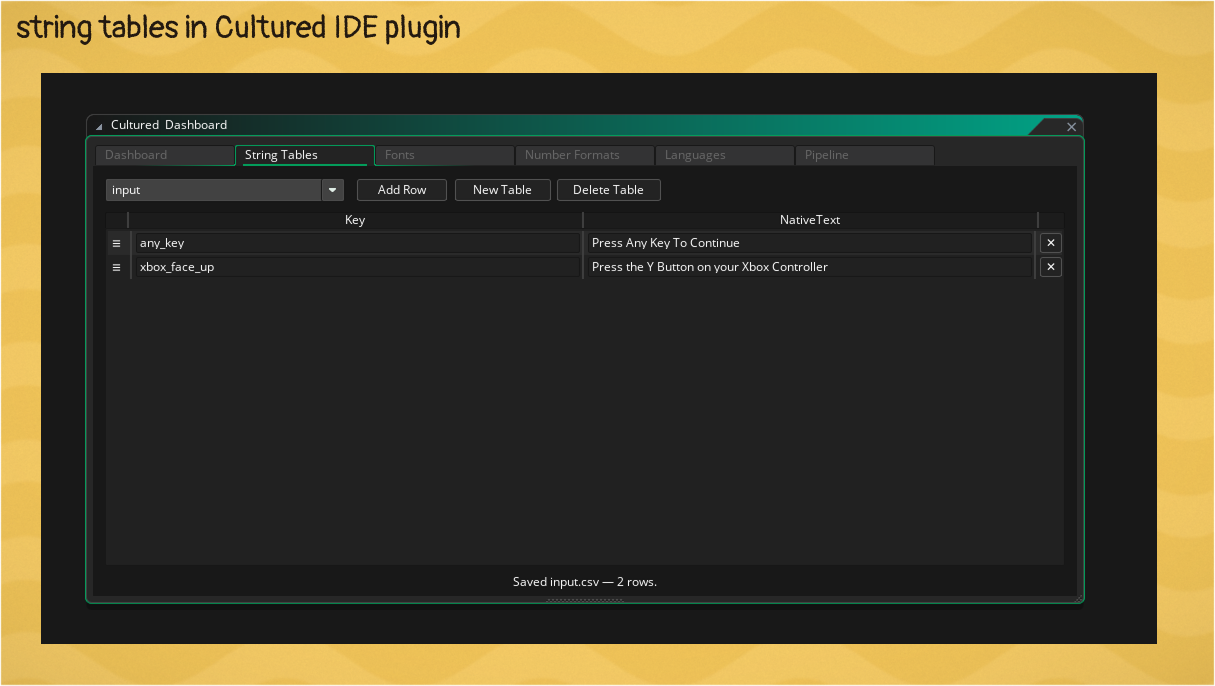
String Tables are .csv files (comma separated values) that live in the Cultured Working Dir which is at {project root}\Cultured\StringTables. You can manually add .csv files to this directory using any editor you choose or you can use the Cultured IDE plugin and author the content inside Game Maker.
Author Externally: Anywhere Else
If you need to localize large amounts of text from external programs like dialogue tree graphs the suggestion is to add a .csv generator to the Configurable Pipeline before the gather phase and load them in as Cultured String Tables in the Cultured Working Dir. Please reach out to us if you need more external gather features.
Text and Number Formatting
Cultured supports a range of formatting syntax to help you and your translators display text exactly as needed per language. Examples here are shown in GML but any type of Cultured authored text supports all of these formats.
Formatting: Variable Injection
For simple variable injection handlebars templating syntax is supported. This is not the same as Game Makers string literals. Authoring your dynamic text and using cultured_format allows your translators to put the variables in any part of the sentence structure as dictated by their language rules.
autogen::obj_enemy::Hello {playerName} how are you?// create event
text = cultured("Hello {playerName} how are you?");
formatted_text = cultured_format(text, { playerName: "John Eightgames" });
player_font = cultured_get_font("header");
// draw event
draw_set_font(player_font.font);
draw_text(x, y, formatted_text.str);Formating: Plurals
Pluralization syntax is more verbose but allows the correct word for the correct subject in all languages while keeping the decision making up to the translators.
The syntax takes
- an argument name to use later in the formatter ( here
count) - a mode to tell the parser what we're doing ( here
plural) - followed by an key value pair of
categoryandcontent.
Available categories are zero, one, two, few, many, other. You will find these pluralization techniques are not only useful for other languages, but for your native language as well.
// create event
love_text = cultured("I love gamemaker {loveCount} {loveCount, plural, one {# time} other {# times}}")
love_font = cultured_get_font("header");
love_count = 0;

// draw event
draw_set_font(love_font.font);

love_count = (love_count + 1) % 10;

// "I love gamemaker 0 times"
// "I love gamemaker 1 time"
draw_text(x, y, cultured_format(love_text, { loveCount: love_count }).str);
Pluralization Logic
Cultured may not have logic for your language or the wrong set of rules might be used. If this is the case please report it and write your own set of rules for the language
cultured_add_plural_rule("en", function(_n) {
	if (_n == 0)
  {
     return "zero";
  }

  return "other";
});
Formating: Numbers
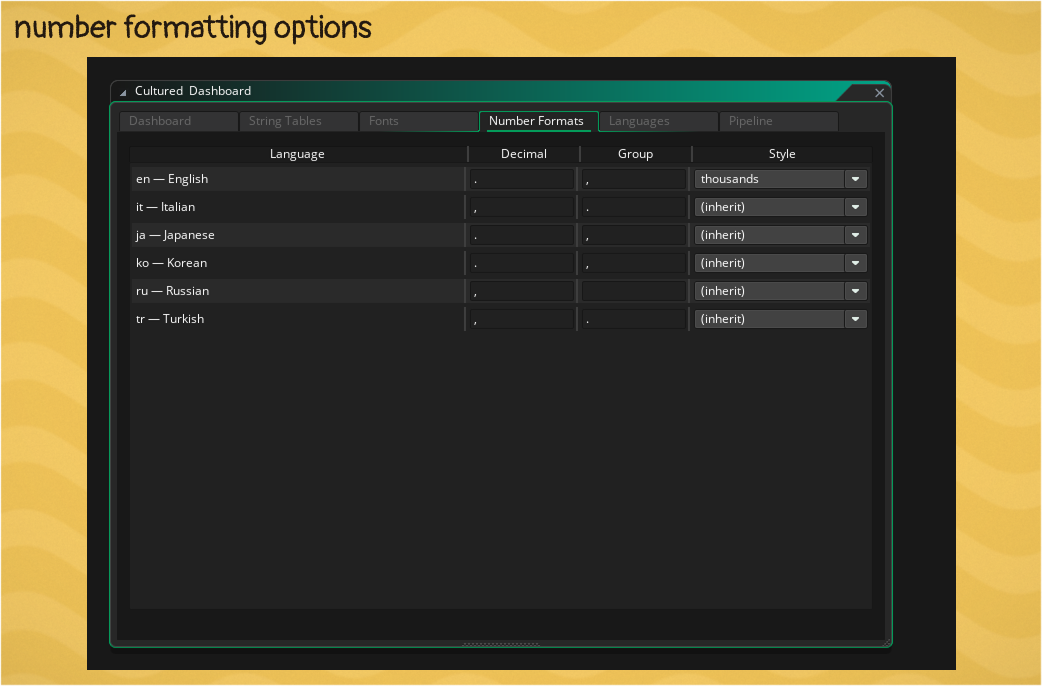
Cultured supports basic number formatting with controls for decimal and group delimiters as well as the grouping arrangement.
autogen::obj_gamemakerlove::I love gamemaker {loveCount, number} times// create event
number_text = cultured("I love gamemaker {loveCount, number} times")
number_font = cultured_get_font("header");
love_count = 0;
// draw event
draw_set_font(number_font.font);
love_count++;
// "I love gamemaker 3,458 times"
draw_text(x, y, cultured_format(number_text, { loveCount: love_count }).str);An optional third argument sets how many decimal places to show. The decimal separator follows the same per-language rules as the group delimiter.
autogen::obj_shop::That costs {price, number, 2} coins// create event
price_text = cultured("That costs {price, number, 2} coins")
price_font = cultured_get_font("header");
// draw event
draw_set_font(price_font.font);
// "That costs 1,250.50 coins"
draw_text(x, y, cultured_format(price_text, { price: 1250.5 }).str);