
Rendering Text
Rendering text and listening to language change events is easy in Cultured.
Composite Fonts
Cultured supports Composite Fonts which allow you to easily map multiple Game Maker Font Assets to different language. When using a Composite font you have an option to allow Cultured to use your games translated text to automatically generate glyph ranges which can help reduce texture pages and allow you to support languages with an unfair amount of glyphs. Add composite fonts to your game in the Cultured Dashboard -> Composite Fonts tab.
Using a composite font allows you to render the correct glyphs without having to do any manual language checking.
See this draw example:
/// create event
// its best to store a _get call to avoid look ups every frame.
header_font = cultured_get_font("header");

/// draw event
// the .font property contains the Game Maker Font Asset needed
// to render in the current language
draw_set_font(header_font.font);
Composite Fonts and the Asset Compiler
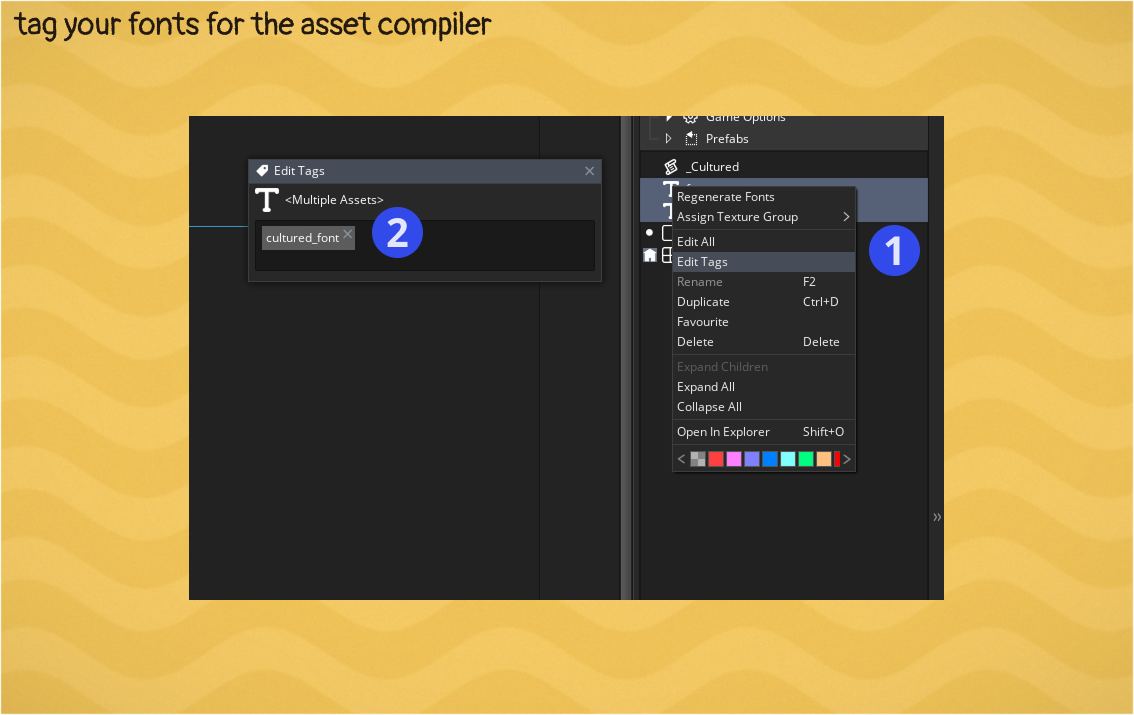
Game Maker tries to do you a favor by not wasting space and time packing fonts that are not used by your game. It does this by looking at what your .gml files reference. If your project does not reference the Font Asset directly in gml then add an asset tag to the desired Font Assets to force Game Maker to cook these fonts.
Keeping Text And Font In Sync With Current Language
When you use a Cultured _get function to fetch text you do not get a raw string or font asset. You get a struct containing a raw string or font asset that Cultured Runtime automatically keeps up to date with the latest language. So typically no legwork is needed to render the text if you use the default Cultured design.
When using a Cultured _get function it is best to store the result somewhere once, not every frame.
/// create event
text1 = cultured("hello");
header_font = cultured_get_font("header");

/// draw event
draw_set_font(header_font.font);

draw_text(x, y, text1.str); // prints "hello"
cultured_set_current_language("fr");
draw_text(x, y, text1.str); // prints "bonjour"
Manually Polling The Language
For uses beyond Cultures design or support you can manually poll the language and do anything you'd like with custom logic in your games own gml code.
font = undefined;
switch (cultured_get_current_language())
{
  case "fr":
    font = fnt_french;
    break;
  default:
    font = fnt_english;
    break;
}

draw_set_font(font)
draw_text(x, y, my_string);
Subscribing to language changed events
You are in control of when the language changes, but if you need an event for that Cultured has one.
cultured_on_language_changed(function(_new_lang, _old_lang) {
  do_something(_new_lang);
});